For architects
A review desk for the practices you design.
The Project Workspace is built for boutique dental-architecture firms that want to show owners and contractors a clear model of the design, on the firm's terms and under the firm's control.
Who it is for
Firms with five to thirty dental projects a year.
Practices that design dental offices as a specialty, or as a steady part of a wider healthcare portfolio. Usually one to ten people, and a client base of dentists who are making the largest purchase of their professional lives and want to see what they are buying before it is framed.
You keep the drawings, the design authority and the client relationship. We add a reviewed model, consistent views and a place to present them that shows only what you have released.
The workspace
How project management, review and sharing work.
Your portfolio
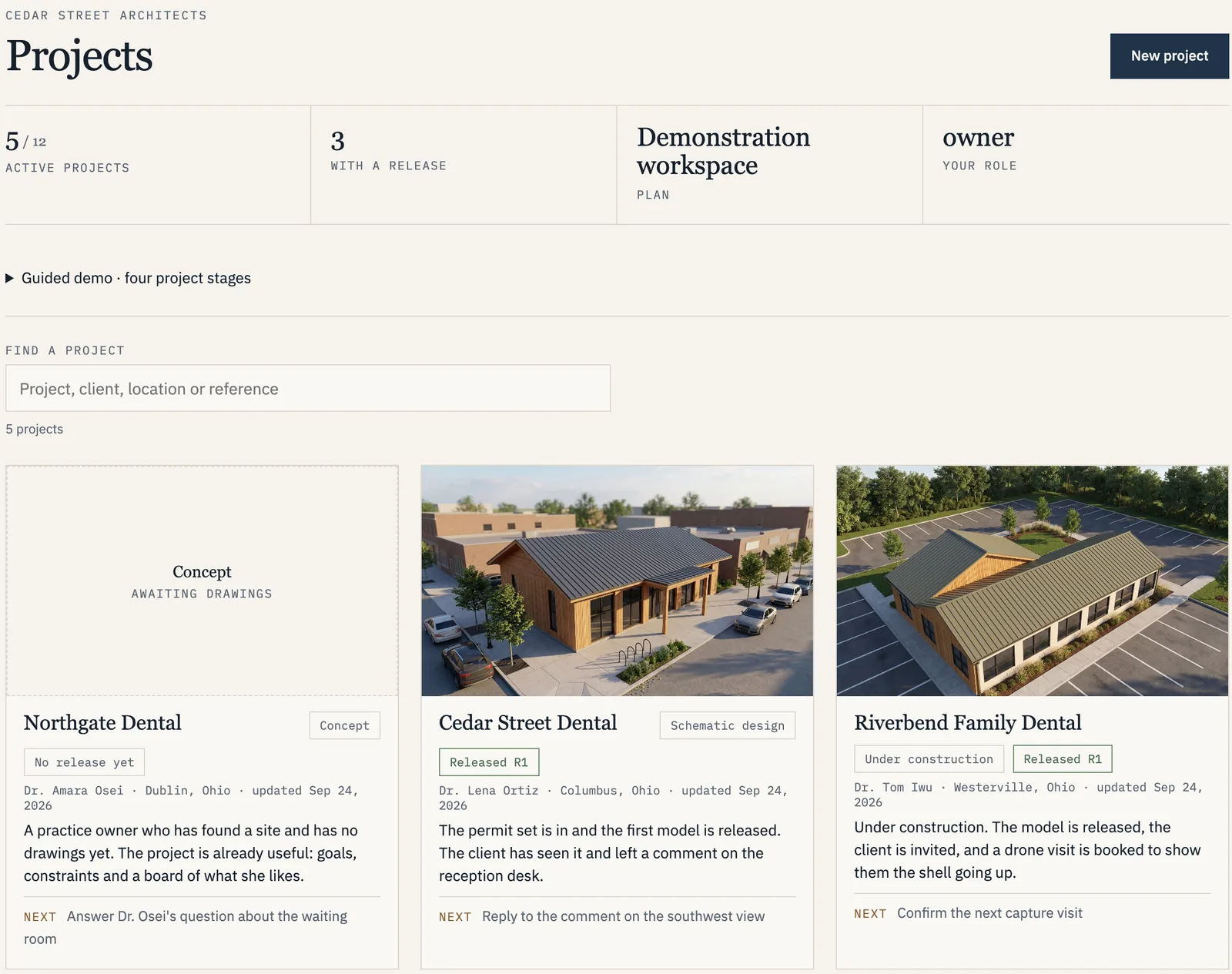
Every dental project at a glance.
- Stage, release and next step on each card
- Search by project, client or location
- One place for drawings, drafts and invitations
-
Projects
Firm members
Create a project inside your firm, name it, and add the members who will work on it. Projects start with no guests. Everything inside a project points back to the plan-set version it was built from.
-
Plan sets
Architect
Submit PDF sheets with their index and revision date. A plan set is fixed once submitted; a revised set is a new version, never an edit. The source-plan date and the submission date are recorded separately.
-
Review
Architect · Studio
Compare each draft to the source sheets side by side. Resolve assumptions, request corrections, then approve a named version. Drafts are visible only to your firm and the studio; nothing reaches a guest until you release it.
-
Invitations
Architect
Invite a client or a contractor by name. Choose the release they may view, the assets included, the expiry date, and whether downloads are allowed. Source plans and downloads are off by default; a contractor's role alone never grants access to every sheet.
-
Revocation
Architect
Revoke any guest at any time without affecting the others. A revoked or expired invitation shows a plain message — that the invitation is no longer available — and nothing about the project.
-
Billing
Firm administrator
One subscription per firm, sized by architect seats and active projects and invoiced monthly or yearly. Production packages are invoiced per project against a fixed quote. Hosting of released versions is included while the subscription is active. See pricing →
What a client receives
A clear view of one released version, and nothing more.
A client is invited by name and verifies the invitation before seeing anything. Then, for that release, they receive:
What your client opens
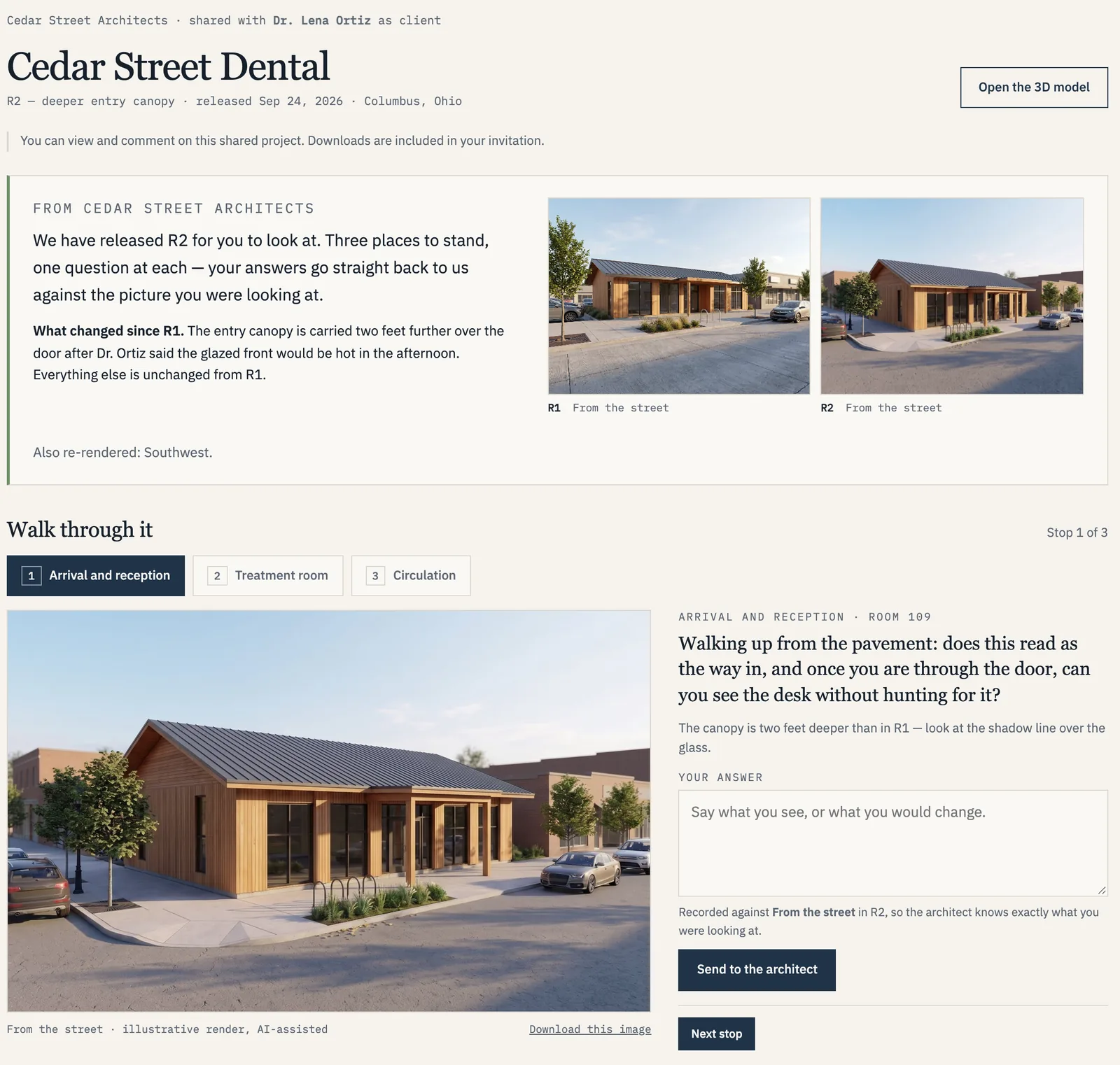
Your firm's name, your released design, nothing to install.
- Opens on any phone or laptop, no app to install
- A guided walk-through instead of a PDF
- You decide what they see and when; feedback stays in your own process
Screens from the demonstration workspace. Every practice, person and flight in it is fictional.
Included
- The project title and the released version's revision date.
- The rendered study and the model study, with four labeled views.
- The interactive viewer. With an image set and room summary as a fallback when a device cannot run 3D.
- The assumption log, so an open question is never read as a decision.
- A record that the release reached them, without asking them to do anything.
- Downloads, only where you switched them on.
Never included
- The plan set or any source drawing, unless you grant a specific package to a contractor.
- Draft outputs or superseded versions.
- Your firm's other projects or other clients.
- Team administration, billing or storage details.
- The ability to re-share. Guests cannot pass their access on to anyone else.
What you control
Every invitation is explicit about five things.
- Recipient
- Every invitation names one person. There is no public link, and a guest cannot forward their access.
- Assets
- Choose what the guest can see: the rendered study, the model study, the viewer, the assumption log, and, for a contractor, an optional specific source-plan package.
- Expiry
- Set a date. Expired invitations stop working without any action from you, and can be extended if the project runs long.
- Downloads
- Off by default. Enable them per invitation when a contractor needs a file, and see each download in the activity log.
- Revoke
- One action, immediate, recorded in the log. Other guests on the same project are unaffected.
The 2026 pilot
We are inviting a small number of firms to work with us this year.
Pilot firms receive introductory pricing, a named production contact, and a direct say in what the workspace becomes next. In return we ask for candid feedback and a few reviewed projects. The security summary and pilot terms are shared on request before anything is signed.
Explore the demo Start a pilot conversation → Sign in
The demo is four example projects you open as the architect, then as the client or a project partner — the review desk exactly as your clients would see it.